The rest of the band, on cue.
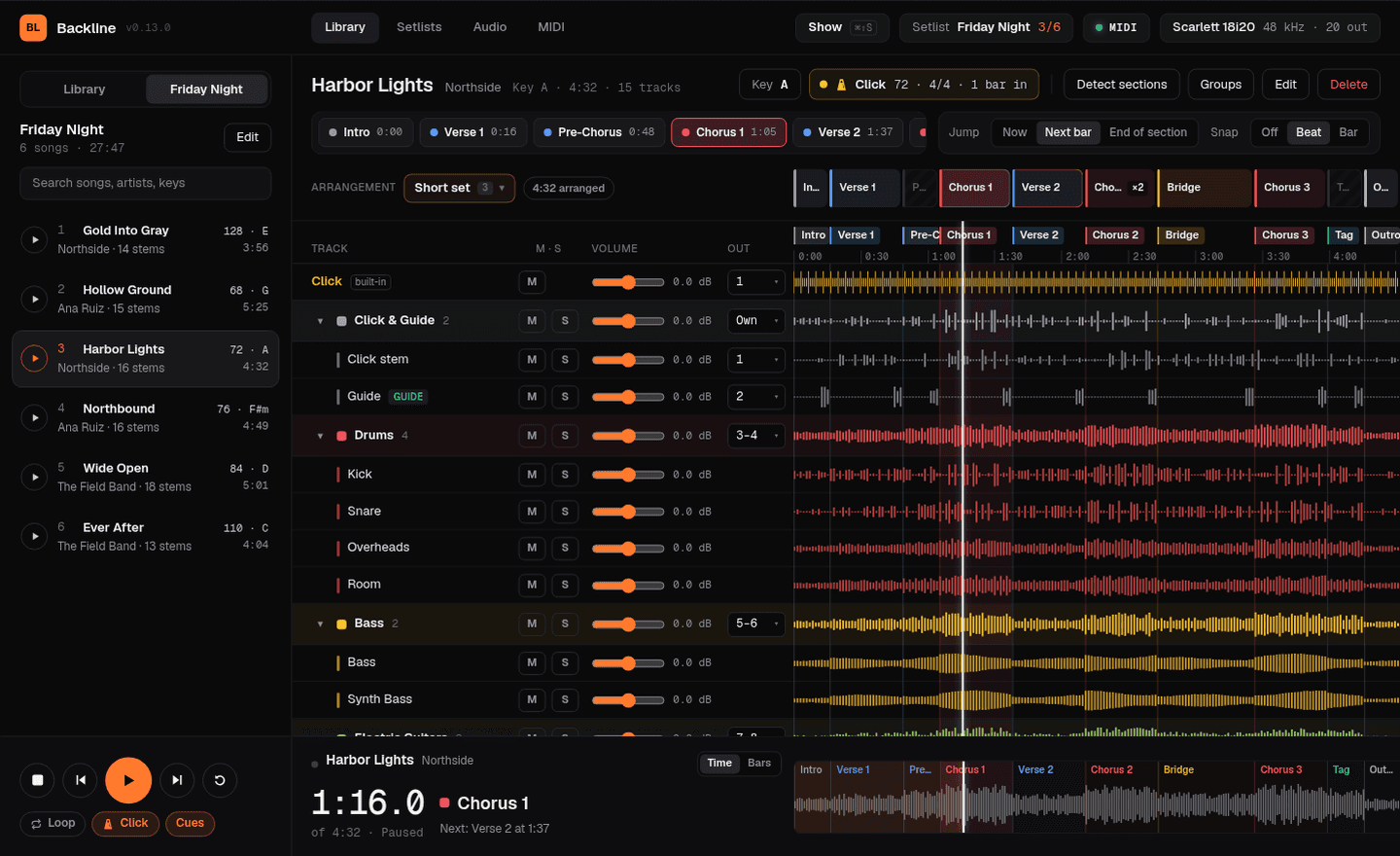
Backline plays your multitrack stems live. Every group goes to its own output, the click and spoken cues reach only the band, and any section is one tap away.
Built for the moment the plan changes.
Jump anywhere. Land on the bar.
Tap a section and Backline queues it for the next bar or the end of the current section. Repeat a chorus, skip a verse, or loop the bridge for as long as the room needs.
No marking up songs by hand. On-device AI speech recognition listens to the spoken cues on your guide track (“Verse 1”, “Chorus 2”, “Bridge”) and places a named, color-coded marker on the bar line after each one. It runs offline once its model has downloaded.
Every group on its own channel.
Send drums, bass, keys and pads to separate outputs so front of house mixes them like live players. Pick mono, a stereo pair, or let each track keep its own output.
A click only the band hears.
The built-in click follows each song’s tempo and meter. Spoken cues call the next section a bar ahead, and the click ducks underneath so nobody misses the count.
Run the show from your feet.
Press MIDI learn on any control, then tap a footswitch, pad or key. Play, stop, change songs and jump to sections without looking at the screen.
The whole night, in order.
Build setlists from your library and step through them with one button. Backline flags missing stems before you leave for the gig, not during soundcheck.
A shorter version for the early show. A longer bridge for tonight.
Rearrange a song's sections without touching the audio. Repeat a chorus ×2, trim a section to a few bars, or drop a verse. Every cut lands on a bar line, so the click and the band stay in time, and each setlist can pick its own arrangement.
Change key without re-recording.
Pick the key you want to play in and the pitched groups move with it. Every group has a Transpose switch, so you decide what follows the key: bass, guitars, keys, pads and vocals by default, with drums, click and guide left alone. Change it mid-song and the new pitch fades in without stopping.
One screen you can read from across the stage.
Show mode puts the setlist down the left, with the current song filling up as it plays. Every stem gets its own waveform lane with mute and solo, under one playhead. The section, bar count and what comes next sit beside the song title, and the clock reads in minutes or in bars and beats.
Built so nothing happens by accident. Song changes and Stop need a second tap while playing, and leaving takes a one-second hold. Turn on Auto-start and the next song begins as soon as the last one ends.
Works with the rig you already own.
If your computer sees it, Backline can use it. No drivers of our own, no proprietary controllers.
A DAW is built for the studio. Backline is built for the stage.
Buy it once. It’s yours.
A perpetual license with every feature. No subscription, no account needed at the gig.
Backline
For one player or MD with a main rig and a backup.Backline Team
For several rigs or rotating music directors.Bands, touring acts, worship teams, venues, theatre and schools.
Prices in USDAUDNZDEURGBP. Need more than 6 computers? Talk to us.
Questions
Do I need an internet connection at the show?
No. You activate once with your key, and after that Backline runs fully offline.
Can I mix Mac and Windows on one license?
Yes. Each seat can be either platform, and you can switch whenever you like.
How do I move my license to a new computer?
Deactivate the old computer from Settings → License, or from your license page if the old machine is gone. Then activate the new one with the same key.
What audio files can I import?
WAV, AIFF, FLAC, MP3 and M4A (AAC or ALAC). Drop a folder of stems and Backline reads the BPM and key from the names, keeps each track name and suggests a group. Your files stay where they are; nothing is copied.
How many outputs can I use?
Every output your interface has. Each group can go to a mono output, a stereo pair, or keep per-track outputs, and routing is saved per device and per song.
Can I get a refund?
Yes. If Backline isn’t right for your rig, email us within 30 days for a full refund.
Is there a free version?
Yes. Without a license Backline runs as Backline Free: 3 songs, 1 setlist and stereo (outputs 1–2), with every other feature working (Detect sections runs on your free songs). Buy a license and everything unlocks on the spot; your library stays as it is.